See what your AI agents are building.
Chessboard is a visual project workspace. Keep your project map, Markdown docs and tasks together while your coding agent does the work.
Bring your own agent. Start with one small project.
Start with the idea.
“A small online shop. Guest checkout. No lost carts.” Give your agent the brief and a place to keep the decisions.Give your agent the brief and a place to keep the decisions.
See how it fits together.
Your agent can turn the architecture into an editable diagram. Select a component to explore the document and work behind it.Explore the components, documents and work behind your project.
Watch the plan become work.
Tasks give the map meaning. See what’s finished, what’s moving and what still needs attention without reconstructing a chat.Follow what’s finished, what’s moving and what needs attention.
Leave the next session a starting point.
Keep the changes, checks and next steps with the project. Tomorrow’s agent can read the handoff before it picks up the work.Keep changes, reported checks and next steps with the project.
Guest checkout.
Keep the cart.
Check stock before payment.
Guest checkout. Keep the cart. Check stock before payment.
Components connect to their documents and linked work. Select one to explore.
In progress
Follow the saved update into the map.
- Changed
- Payment retries implemented.
- Reported
- Sandbox callbacks tested.
- Next
- Build confirmation delivery.
Checkout decisions.md
Check stock before taking payment. Create the order only after payment succeeds. Keep retries safe.
Linked work
Build the purchase flow
Shared with the project, not buried in a chat.Next session
The purchase flow is connected. Stock checks and payment retries still need testing.
Example handoff. Checks are reported by their author.Interactive illustration of Chessboard concepts. Example data, no agent running.
Customer experience.md
A fast product browser with a persistent cart. Customers can check out without creating an account.
Linked work
Keep the cart after sign-in
Shared with the project, not buried in a chat.Next session
Cart recovery is covered. Next, connect the product page to the stock response.
Example handoff. Checks are reported by their author.Checkout decisions.md
Check stock before taking payment. Create the order only after payment succeeds. Keep retries safe.
Linked work
Build the purchase flow
Shared with the project, not buried in a chat.Next session
The purchase flow is connected. Stock checks and payment retries still need testing.
Example handoff. Checks are reported by their author.Order model.md
Keep order items, totals and payment references together. A pending order is not a completed purchase.
Linked work
Define the order model
Shared with the project, not buried in a chat.Next session
The initial schema is documented. Refunds are outside the first release.
Example handoff. Checks are reported by their author.Payment integration.md
Use sandbox payments until the full purchase journey has been checked. Duplicate callbacks must not create duplicate orders.
Linked work
Handle payment retries
Payment retry task is in progress.Next session
The retry path is ready to review. Production payments have not been enabled.
- Changed
- Payment retries implemented.
- Reported check
- Duplicate callbacks tested in sandbox.
- Next
- Build confirmation delivery. Keep production payments off.
Order confirmation.md
Send one confirmation after a successful purchase. A failed email must not cancel a paid order.
Linked work
Send order confirmation
Shared with the project, not buried in a chat.Next session
The template is planned. Delivery and retry behavior remain to be implemented.
Example handoff. Checks are reported by their author.Product catalog.md
Products have a name, variants and available stock. The shop checks availability again when an order is placed.
Linked work
Build the product catalog
Shared with the project, not buried in a chat.Next session
Product browsing is in place. Next, finish the final stock check at checkout.
Example handoff. Checks are reported by their author.Your agent codes.
You keep the big picture.
Keep working in your preferred tool. Chessboard gives the project a shared home you can open without digging through a chat.
Your coding agent
Codex, Claude Code, Cursor
and other MCP clients
Save updates

Your Chessboard workspace
Project maps, documents,
tasks and handoffs
Connect your agent
Choose its access in Connections, follow the setup instructions and install the Chessboard skill.
Give it a useful starting point
Ask it to explain the project, draw the important relationships and record the next steps.
Build with context
As it works, the agent can maintain the docs and tasks. You can read, edit and ask questions alongside it.
Try this with your connected agent
Read this project and explain how it works in Chessboard. Create a concise project map, link the important components to tasks, and document what remains unclear. Ask before changing code.
From the picture
to the actual work.
The illustration tells the story. Here’s the real workspace: editable Markdown, linked tasks and a handoff you can return to.
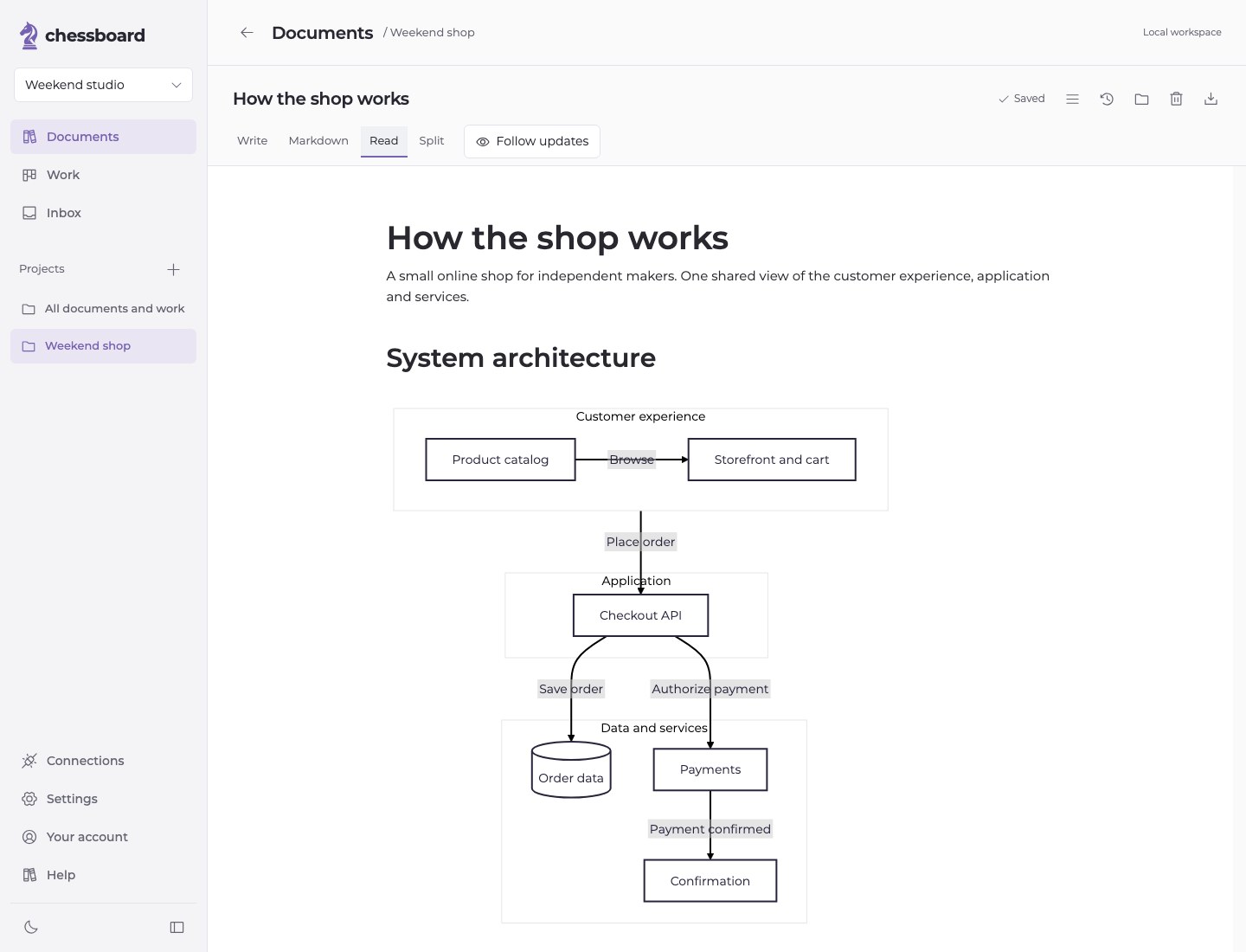
The explanation belongs to you.
Edit the source, review changes and export your Markdown.
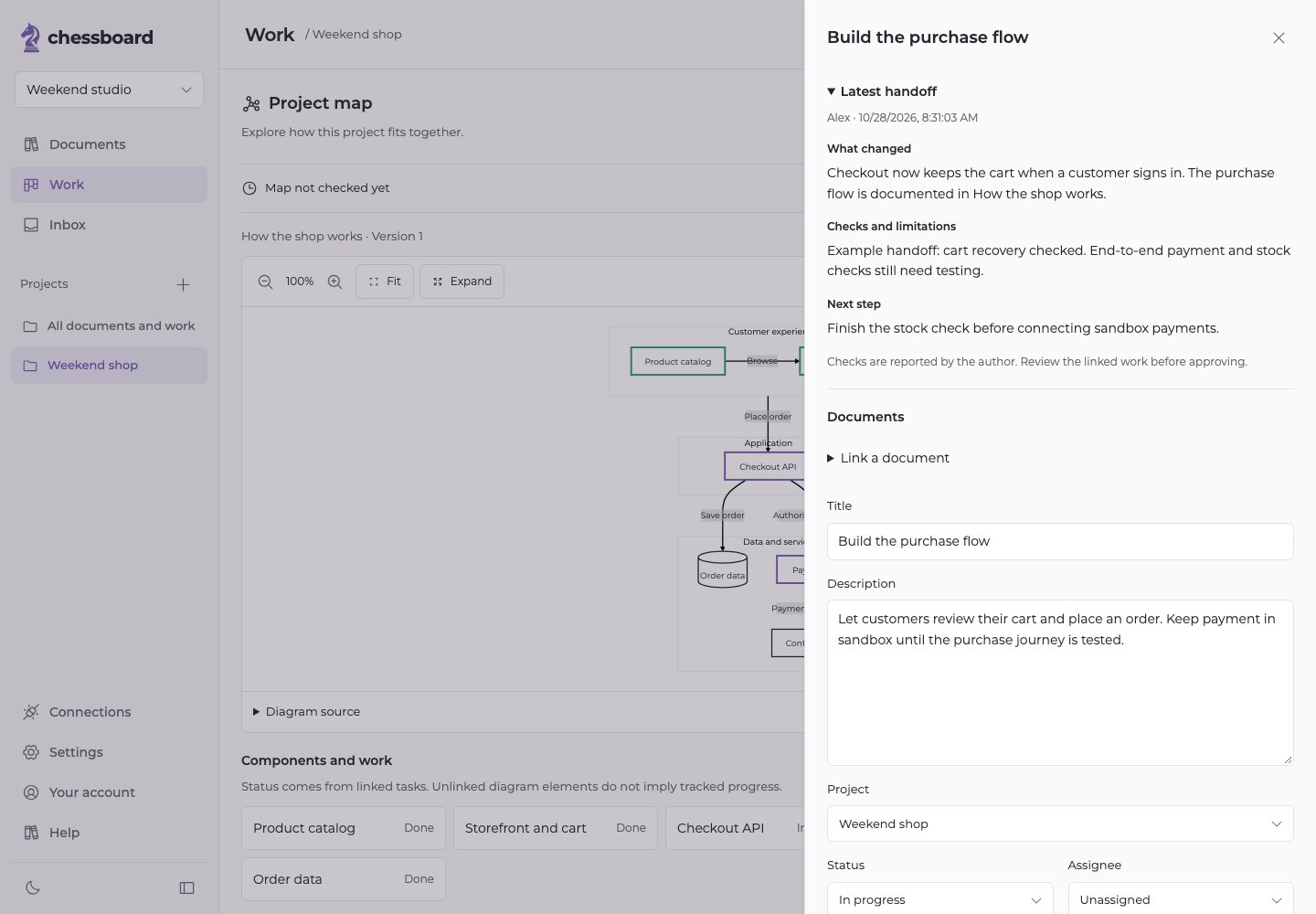
The next step stays visible.
See the work, the author’s checks and what still needs attention.
A weekend project.
Or the next release.
Start with a document and a few tasks. Add a map when relationships get harder to follow. Bring teammates in when the work grows.
No sprint setup or mandatory approval ceremony. Choose human review where it helps.
Building soloRemember why you made a decision when you return next week.
Working with a small teamShare the same plan, open questions and next steps.
Switching agent sessionsContinue from shared documents and a useful handoff.
A few things to know.
Does Chessboard run my agents?
Your agent runs in your own coding tool. Chessboard supplies shared context and permission-controlled tools through MCP. It does not start an agent or automatically resume one when you answer a question.
Do I need to move my code?
No. Your code stays in its repository and your agent works in its existing environment. Chessboard holds the project knowledge and work around it.
Will my diagrams stay accurate automatically?
The skill guides agents to maintain diagrams and report what they checked. Chessboard identifies changed map documents and unavailable links, but it does not independently inspect your code or guarantee a diagram is correct.
Can I start free?
Yes. Free includes Markdown editing, tasks and two agent connections within the Free limits. Your agent provider bills model usage separately. See Pricing for workspace allowances and paid-plan availability.
Give your next project a shared home.
Connect your agent. Make the work easier to follow.